Mac disk space analyzer · $12.99 once
The disk space analyzer that clears your Mac
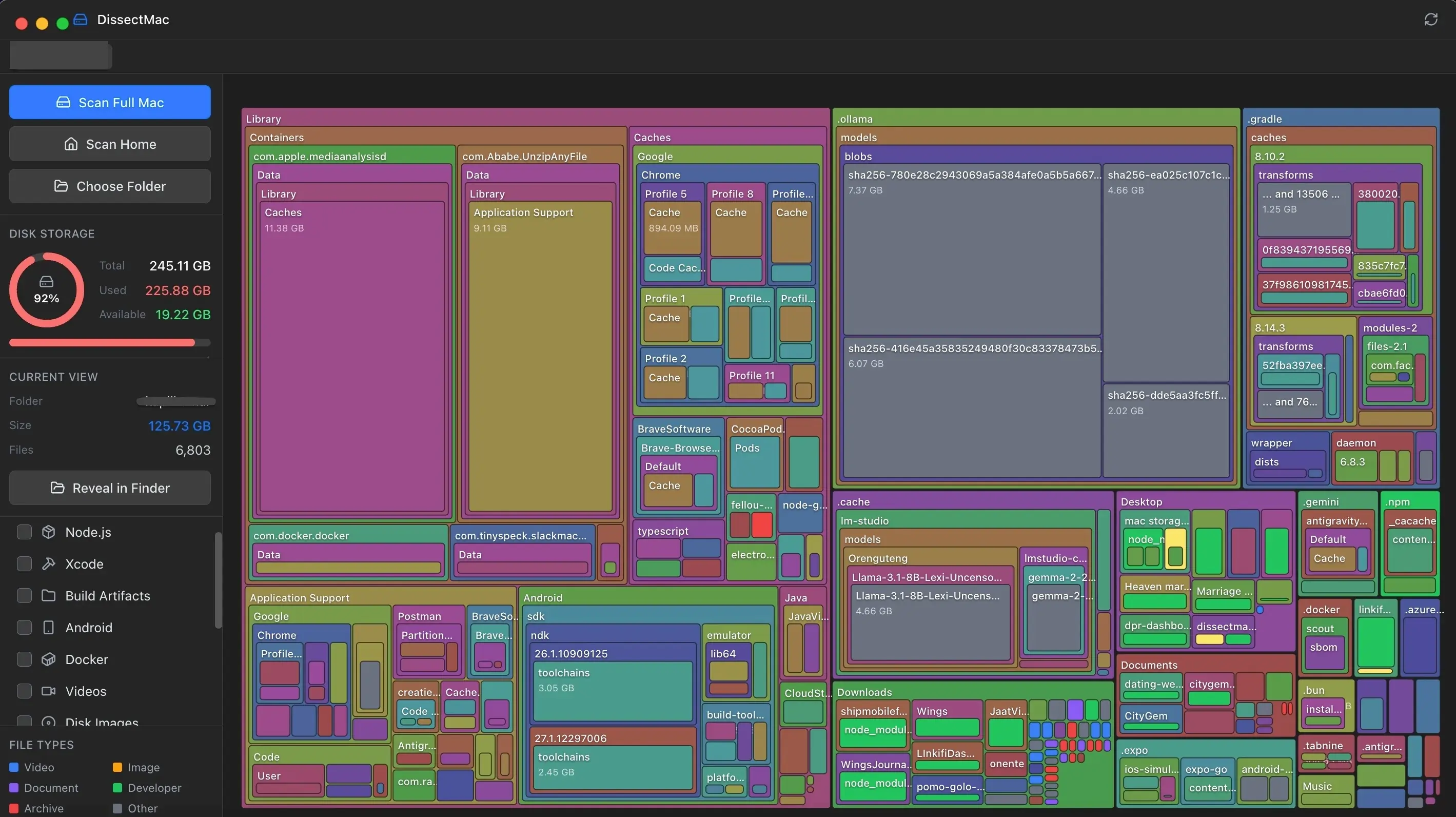
See every folder on your drive drawn to scale, find what's taking up space, and clear it in a few clicks. The map is free. Pro is $12.99 once. No subscription, ever.
One-time payment · 15-day money-back guarantee
Not sure yet? Download the free analyzer first
- Notarized by Apple
- Licence key sent by email
- Files never leave your Mac
- Lifetime licence, no subscription
- $12.99 once
- Lifetime licence, no subscription
- No-questions money-back guarantee
- 15 days
- No-questions money-back guarantee
- No uploads, no account
- 100% local
- No uploads, no account
- Built for macOS, Apple Silicon first
- Native
- Built for macOS, Apple Silicon first
Where the space goes
Six things that fill a Mac. None of them is your photos.
macOS hides the biggest space hogs in folders Finder never shows you. DissectMac finds them in one scan.
System Data
caches, logs, snapshots, app containers
The grey bar in Settings that won't explain itself. DissectMac opens it up folder by folder.
Xcode build files
~/Library/Developer/Xcode/DerivedData
Every build and simulator you've ever run leaves files behind. They're safe to clear and Xcode rebuilds them.
Docker disk image
~/Library/Containers/com.docker.docker/…/Docker.raw
One file that can quietly grow to tens of gigabytes. See its real size on disk.
node_modules
one in every project you've ever cloned
Hundreds of copies spread across old projects. Find them all in one scan.
Local AI models
~/.ollama/models · LM Studio · Hugging Face cache
Each model is several gigabytes. Easy to download, easy to forget.
Leftovers from deleted apps
~/Library/Application Support
Dragging an app to the Bin leaves its support files. DissectMac finds the orphans.
Pro finds every one of these and clears them in a few clicks.
One-time payment · 15-day money-back guarantee
Scan. See. Clear.
Every clean-up tool in DissectMac Pro, for one payment. The map, search and monitor are free.
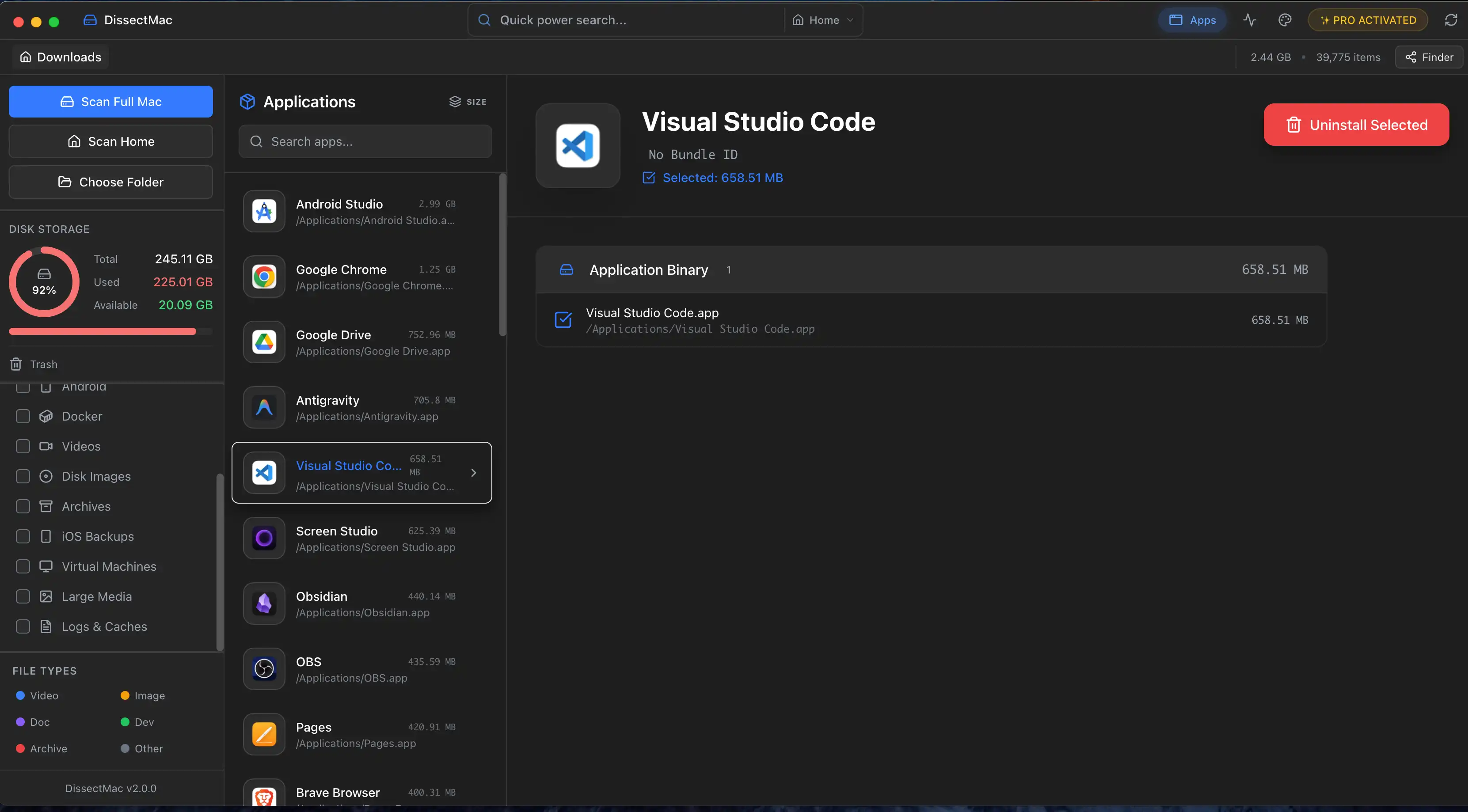
Remove apps and everything they left behind
Deleting an app leaves its containers, caches and preference files behind. DissectMac finds them and removes the lot.
How it works
How DissectMac cleans a Mac
There's no button that deletes things you haven't seen. You look first, then you decide.
Scan your Mac
Click Scan Full Mac. DissectMac reads every folder on the drive, including the hidden Library folders where caches, app leftovers and developer files pile up. A 500 GB drive takes about a minute.
See what's taking up space
The disk space analyzer draws the drive as a map: every folder is a block sized by the space it uses, so the biggest problems are the biggest shapes. Click into a block to go deeper, search by name, or filter to Xcode, Docker, node_modules, disk images, archives and iOS backups.
Clear it
Select what you don't need and move it to the Trash from inside the app, uninstall an app together with the files it left behind, or clear leftovers from apps you deleted years ago. Everything goes to the Trash first, so nothing is gone until you say so. Clearing is Pro, $12.99 once.
One price. Every tool. Yours for good.
CleanMyMac charges a yearly subscription. DaisyDisk is a one-time purchase but stops at the map. DissectMac Pro is one payment for the map and the cleanup, with future updates included.
DissectMac Pro · lifetime licence
$12.99one time, plus tax
Pay once. Nothing to renew, no account to keep.
One-time payment · 15-day money-back guarantee
- Delete files right inside the app
- App uninstaller that removes leftovers
- Find and clear files from deleted apps
- Reveal in Finder, open archives and folders
- Premium themes
- Priority email support
- Storage map of any drive or folder
- Find large files
- Fast search across your Mac
- Live CPU, memory and battery stats
15-day money-back guarantee
If Pro doesn't earn its place, email [email protected] within 15 days for a full refund. No questions asked.
Only want to look? The storage map is free. Download the free version
Guides
Fix it yourself first
Step-by-step Mac cleanup guides, written from what the app finds on real Macs. Most of them need no software at all.
Uninstall
Uninstall apps properly
Remove an app and the caches, containers and preferences it leaves behind.
Free up space
Free up space
Caches, downloads, backups, duplicates and developer junk, biggest first.
System Data
System Data
What the grey bar holds, why it grows and how to shrink it safely.
Speed
Slow Mac
Find what's eating CPU and memory, then fix it.
Check storage
Check storage
What the built-in tools show, and what they hide.
Compare
Compare tools
DaisyDisk, CleanMyMac and the free options, side by side.
Questions about DissectMac
Get your gigabytes back for $12.99.
One payment, yours for good. If it doesn't earn its place in 15 days, email us for a full refund.
One-time payment · 15-day money-back guarantee
Not sure yet? Download the free analyzer first