On this page
- Quick picks
- DaisyDisk alternatives compared
- 1. DissectMac: see it and clear it in one place
- 2. GrandPerspective: the best 100% free option
- 3. PocoDisk: closest to DaisyDisk's design
- 4. OmniDiskSweeper: fastest to read
- 5. Disk Inventory X: the classic, now showing its age
- 6. SquirrelDisk: open source, but stalled
- Open-source DaisyDisk alternatives
- OmniDiskSweeper vs DaisyDisk
- What is the best free alternative to DaisyDisk?
- Is there a free version of DaisyDisk?
- Is DaisyDisk worth $9.99?
- What is a good Disk Inventory X alternative?
- Can you check disk space on a Mac without an app?
- Which one should you use?
DissectMac is the DaisyDisk alternative we recommend for most Mac users in 2026: the storage map is free, and a one-time $12.99 upgrade lets you delete files, uninstall apps and clear what deleted apps left behind, all in the same window. If you want something 100% free, GrandPerspective is the best option (version 3.8.1 shipped on 19 September 2026). DaisyDisk itself costs $9.99.
We make DissectMac, so weigh our pick accordingly. Every other app below is listed with its real price, licence and update status, including the areas where it beats ours.
Quick picks
- Best overall: DissectMac. Free storage map, one-time $12.99 Pro to clean up
- Best 100% free: GrandPerspective, open source and still updated
- Closest to DaisyDisk's look: PocoDisk, free, needs macOS 14+
- Best list view: OmniDiskSweeper, free
DaisyDisk alternatives compared
| App | Price | Open source | How it shows your disk | Uninstaller + leftover cleanup | Still updated |
|---|---|---|---|---|---|
| DissectMac | Map free, Pro $12.99 once | No | Block map sized to scale | Yes (Pro) | Yes, Apple Silicon and Intel |
| GrandPerspective | Free (SourceForge), $2.99 on the Mac App Store | Yes, GPLv2 | Treemap | No | Yes, 3.8.1 in Sept 2026 |
| PocoDisk | Free | Yes, MIT | Sunburst, like DaisyDisk | No | Yes, needs macOS 14+ |
| OmniDiskSweeper | Free | No | Sorted list, largest first | No | Maintained by The Omni Group |
| Disk Inventory X | Free (donations) | Yes, GPL | Treemap + file-type breakdown | No | Last stable release supports macOS 10.13 to 10.15 |
| SquirrelDisk | Free | Yes, AGPL-3.0 | Sunburst | No | No code changes since August 2023 |
| DaisyDisk (for reference) | $9.99 once, free trial | No | Sunburst | No | Yes |
Every app here shows you where your space went. The difference is what happens next. With most of them you find the problem, then go to Finder to deal with it. DissectMac is the only one on this list that also removes apps along with their leftover files.
1. DissectMac: see it and clear it in one place
DissectMac draws your whole drive as blocks, each one sized by how much space it takes. The largest folders are the largest shapes, so a 60 GB Xcode folder or a forgotten Docker image is obvious the moment the scan finishes. Click into any block to drill down.
Free, with no time limit:
- Storage map of any drive or folder
- Large-file finder
- Search across your whole Mac, including the Library folders Finder hides
- Live CPU, memory and network stats
Pro, $12.99 once:
- Delete files from inside the app
- App uninstaller that removes the containers, caches and preference files an app leaves behind
- Cleanup for files left over from apps you deleted years ago
- Reveal in Finder, open archives and folders
There's no subscription and no account, and your files never leave your Mac.
Where DissectMac loses: it's not open source, and Pro costs $3 more than DaisyDisk. What you get for that is the cleanup side. DaisyDisk and the free tools below tell you what's big; DissectMac also finds what uninstalled apps left behind, which is a common reason System Data balloons (see our System Data guide).
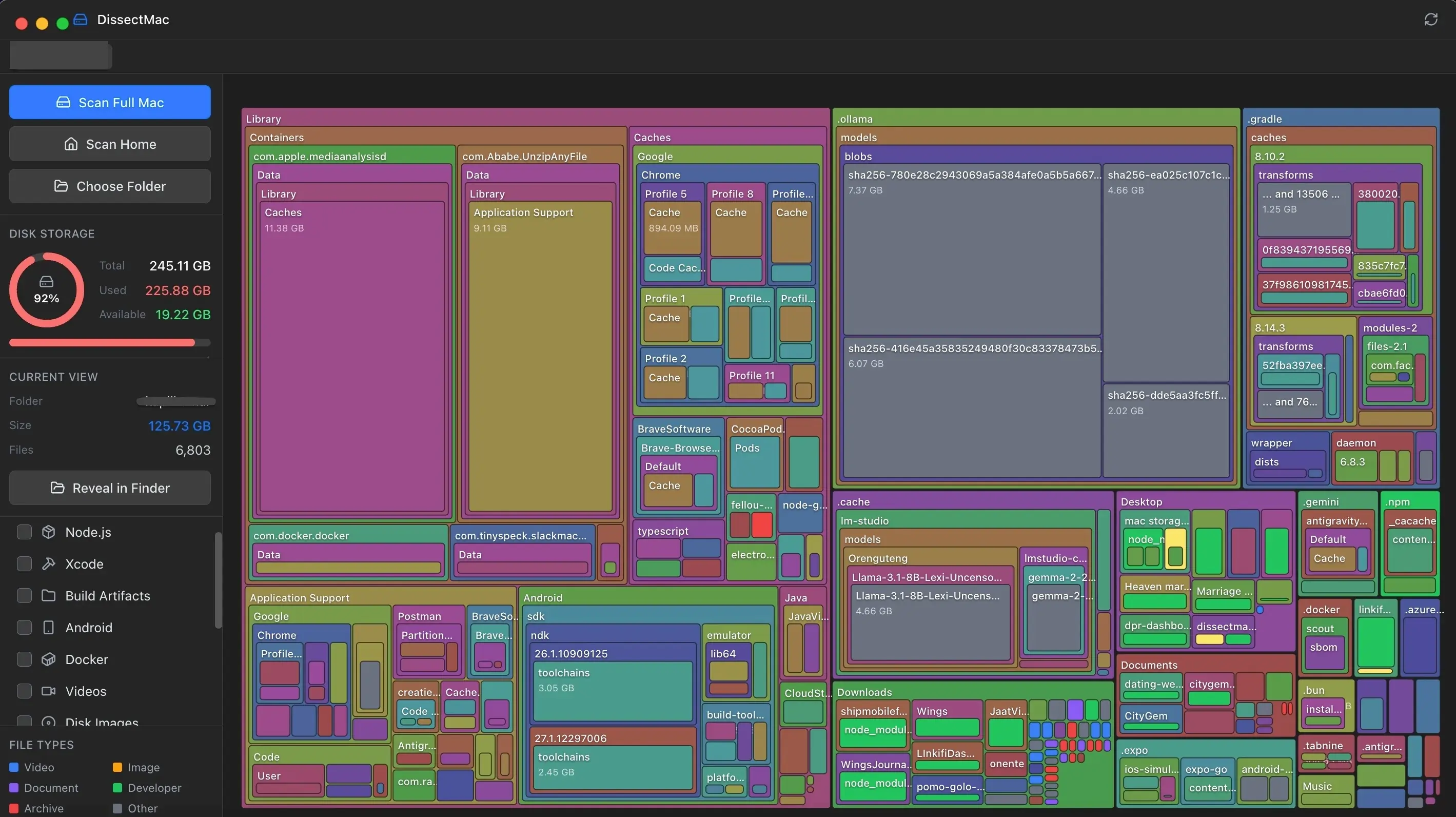
Pick DissectMac if you want to find the space and get it back without switching between apps. See Pro features and pricing.
2. GrandPerspective: the best 100% free option
GrandPerspective shows your drive as a treemap: every file is a rectangle, and bigger files get bigger rectangles. A 40 GB video stands out straight away.
It's still getting releases in 2026. The SourceForge download is free under the GPLv2 licence, and the Mac App Store version costs $2.99 (macOS 14 or later), which is a fair way to tip the developer.
The trade-off is the interface. You move around with menus and keyboard shortcuts rather than clicking straight into a folder, and it can't uninstall apps or find their leftovers. We compared the two apps side by side in GrandPerspective vs DissectMac.
Pick GrandPerspective if you want a free, open-source map and don't mind a plain interface.
3. PocoDisk: closest to DaisyDisk's design
PocoDisk is a free, MIT-licensed disk analyzer built in SwiftUI, and its developers describe it openly as a DaisyDisk alternative. It copies DaisyDisk's sunburst chart, its collector for files you plan to delete, and Quick Look previews.
It needs macOS 14 Sonoma or newer. It's also a young project, with fewer years of real-world use behind it than the older tools here.
Pick PocoDisk if you like how DaisyDisk looks and your Mac runs macOS 14 or later.
4. OmniDiskSweeper: fastest to read
OmniDiskSweeper skips the chart. It lists your folders from largest to smallest in columns, and you can trash or open anything from the list. It comes from The Omni Group (the OmniFocus developers), and older builds are still offered for older macOS versions.
That's basic, and for some people it's the point. If you want "the biggest thing on this drive" ranked for you, a sorted list gets there with less guessing than a chart.
Pick OmniDiskSweeper if you'd rather read numbers than shapes.
5. Disk Inventory X: the classic, now showing its age
Disk Inventory X was one of the first treemap tools on the Mac. Next to the map it shows a breakdown by file type, so you can see how much space goes to videos, disk images or archives.
The problem is age. The last stable release supports macOS 10.13 to 10.15, and newer Macs need a universal beta build. On a current Mac, DissectMac or GrandPerspective gives you the same map idea with active development behind it.
Pick Disk Inventory X if you're on an older Mac or want the file-type breakdown.
6. SquirrelDisk: open source, but stalled
SquirrelDisk is an open-source (AGPL-3.0) analyzer written in Rust that runs on macOS, Windows and Linux. It has around 1,800 stars on GitHub and a sunburst view.
The last code change was in August 2023. It may still run for you, but nobody is fixing bugs or keeping up with new macOS releases.
Pick SquirrelDisk if you want one disk tool across Mac, Windows and Linux.
Open-source DaisyDisk alternatives
If open source matters to you, four of the six qualify:
- GrandPerspective (GPLv2): the most mature, still updated in 2026
- PocoDisk (MIT): closest to DaisyDisk's design, macOS 14+
- Disk Inventory X (GPL): a classic, but its last stable release targets macOS 10.13 to 10.15
- SquirrelDisk (AGPL-3.0): cross-platform, but inactive since 2023
For most people, GrandPerspective is the safe open-source pick.
OmniDiskSweeper vs DaisyDisk
DaisyDisk draws a sunburst chart you click through, and it costs $9.99. OmniDiskSweeper shows a plain list sorted by size, and it's free. Both let you delete from inside the app, so the real difference is how you prefer to find things: shapes or numbers. Neither one uninstalls apps or cleans up their leftovers.
What is the best free alternative to DaisyDisk?
For a free visual map, use DissectMac's free version or GrandPerspective. Both show your whole drive to scale at no cost. GrandPerspective is fully free and open source; DissectMac adds search and a live monitor, and you can upgrade to Pro once if you want to clean up inside the app. If you prefer a list, use OmniDiskSweeper.
Is there a free version of DaisyDisk?
DaisyDisk offers a free trial you can download from its website. The full version is a one-time $9.99 purchase. For a permanently free tool, use DissectMac's free storage map, GrandPerspective, PocoDisk or OmniDiskSweeper.
Is DaisyDisk worth $9.99?
DaisyDisk is worth $9.99 if you want a polished analyzer and only need to see and delete large files. It also connects to cloud storage and protects system files from accidental deletion. If you also want to uninstall apps and clear their leftovers, DissectMac Pro covers both for $12.99 once.
What is a good Disk Inventory X alternative?
DissectMac and GrandPerspective are the closest Disk Inventory X alternatives on current macOS. Both draw your drive as a map of blocks sized by space used, and both are actively maintained. DissectMac runs natively on Apple Silicon and adds search and cleanup tools.
Can you check disk space on a Mac without an app?
Yes. Open Apple menu > System Settings > General > Storage to see how much space each category uses. It won't show individual folders, and a large share often lands in a vague "System Data" bucket. Our guides on how to check storage on Mac and what System Data is explain what those numbers mean.
Which one should you use?
- Find the space and clear it in one app: DissectMac, free map, $12.99 once for Pro
- 100% free and open source: GrandPerspective
- DaisyDisk's look for free: PocoDisk (macOS 14+)
- Free list view: OmniDiskSweeper
- Most polished analyzer-only option: DaisyDisk at $9.99
Whichever you choose, start with the largest folders, check what they are, then delete. Our guide on how to free up space on Mac covers the usual culprits, and if you're weighing paid cleaners, see our CleanMyMac alternative page.
More guides
Compare
GrandPerspective is Great. But It's Time for Something Modern.
GrandPerspective is free but feels dated on Apple Silicon Macs. Compare speed, UI & features with a modern alternative. Both are free →
Compare
CleanMyMac X Has a Yearly Subscription. Here's Our Alternative.
Not everyone wants to pay a recurring fee to clean their hard drive. Here's why we built DissectMac as a one-time purchase alternative to CleanMyMac X.
Speed
Why Is My Mac So Slow? 8 Causes and How to Fix Each One
A slow Mac usually has one of 8 causes: a full disk, memory pressure, a runaway process, login items, heat or old hardware. Find yours in 5 minutes and fix it.
System Data
What Is "Other" in Mac Storage, and How Do You Clear It?
'Other' in Mac storage is caches, logs, snapshots, backups and anything macOS can't categorise, renamed System Data in macOS 12. What's in it, how to clear it.