On this page
node_modules folders take up space on a Mac because every JavaScript project keeps its own copy of every dependency, and abandoned projects keep theirs forever. A single Next.js or React Native project's node_modules is 500 MB to 2 GB; twenty old projects is 10 to 30 GB of files you can regenerate with one npm install. Finding them all is the hard part, because they're spread across every folder you ever ran a tutorial in.
This guide covers three ways to find every node_modules folder, how to delete them safely, and the package-manager caches that hide behind them.
How to find every node_modules folder on your Mac
Terminal, with sizes. This lists every node_modules folder under your home folder, largest last:
find ~ -type d -name node_modules -prune -exec du -sh {} + 2>/dev/null | sort -h
-prune stops find descending into each node_modules (they contain nested copies), and du -sh adds the size. On a Mac with many projects it takes a minute or two.
npkill. A small tool built for exactly this:
npx npkill
It scans from the current folder, lists every node_modules with its size and how long since the project was touched, and lets you delete each one with the space bar. Run it from ~ to cover everything, or from your projects folder to keep it quick.
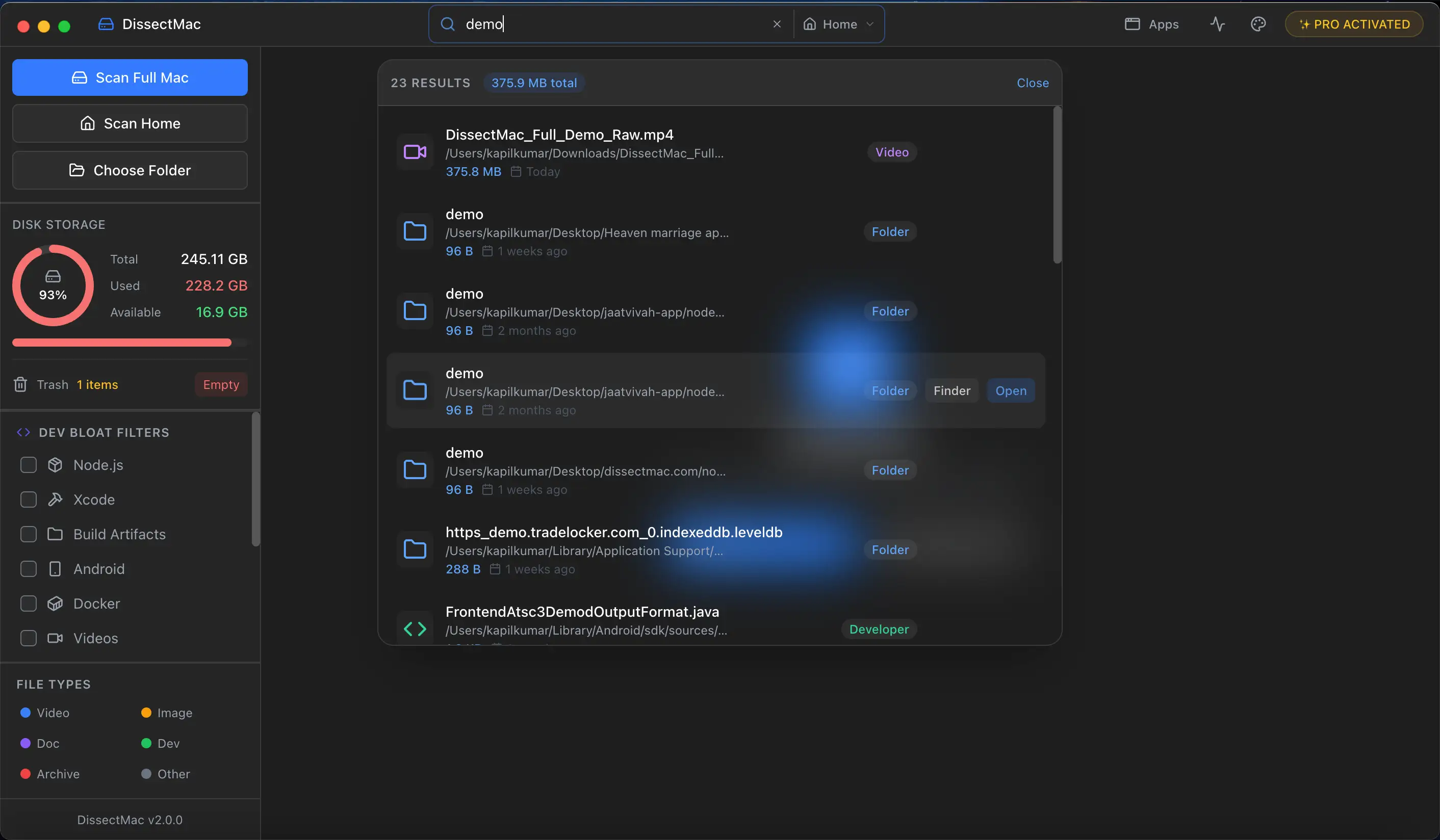
DissectMac. Scan your Mac, type node_modules into the search box, and every copy appears with its size and path. It covers the whole drive, including projects you saved somewhere odd, and you can open any result in Finder to check what the project is before deleting.

How to delete node_modules safely
The rule that keeps this safe: node_modules is never the only copy of anything. Every package in it is listed in the project's package.json and pinned in package-lock.json, yarn.lock or pnpm-lock.yaml, and npm install rebuilds the folder in under a minute for most projects. Your code lives in src and the other project folders, not in node_modules.
So deleting is safe when:
- the project has a
package.jsonand a lock file (it always does if it once worked), and - you're happy to run
npm installagain if you return to it.
To delete one:
rm -rf ~/Projects/old-hackathon/node_modules
To delete every node_modules under a folder in one go (only run this on a folder of projects you're not currently working in):
find ~/Projects -type d -name node_modules -prune -exec rm -rf {} +
A sensible policy: keep node_modules for projects you've touched in the last month, delete the rest. Reinstalling when you come back costs a minute; keeping 20 GB of dependencies for projects you might never open again costs the space every day.
Clear the package manager caches too
Each package manager keeps a global cache of downloaded packages so reinstalls are fast. They grow to several gigabytes and rebuild themselves as needed:
npm cache clean --force        # ~/.npm/_cacache
yarn cache clean               # Yarn cache
pnpm store prune               # removes packages no project references
Check the sizes first with du -sh ~/.npm ~/.yarn ~/Library/pnpm 2>/dev/null (pnpm's store location varies by version; pnpm store path prints it).
Old Node versions
If you use nvm, every Node version you've ever installed sits in ~/.nvm/versions/node, each with its own global packages. List them with nvm ls and remove old ones with nvm uninstall <version>. Volta, fnm and asdf keep versions in their own folders and have equivalent commands.
Why is node_modules so big?
node_modules is big because npm installs every dependency of every dependency as separate files, and modern frameworks pull in thousands of packages. A React app's tree can be 1,000 to 2,000 packages, and build tools, TypeScript, testing libraries and native modules add hundreds of megabytes each. Each project keeps a full copy, so the total on a Mac is the sum of every project you've ever set up.
Is it safe to delete node_modules?
Yes. node_modules contains only downloaded packages, all of which are recorded in package.json and the lock file. Deleting it removes nothing you wrote. Run npm install (or yarn or pnpm install) in the project and the folder is rebuilt exactly as the lock file specifies.
Does node_modules slow down my Mac?
Not by itself, but tools that index it do. Spotlight indexes every file, and Finder's "Calculate all sizes" stalls on folders with tens of thousands of tiny files. VS Code excludes node_modules from search by default; if you've changed that, add "files.watcherExclude": { "**/node_modules/**": true } to its settings. Time Machine also backs up node_modules unless you exclude your projects folder or use a .nobackup approach, which makes backups larger and slower.
Can pnpm reduce node_modules size?
Yes. pnpm keeps one copy of each package version in a global store and links projects to it, so ten projects using the same React version share one copy on disk. Switching existing projects means replacing the lock file and reinstalling, so it's a decision for new projects rather than a cleanup step.
More guides
Free up space
How to Free Up Space on Mac: 12 Fixes That Actually Work
12 ways to free up space on a Mac, starting with the ones that return the most. Includes the hidden folders and leftovers Apple's Storage screen never shows.
Free up space
Docker.raw Is Huge on Mac: How to Shrink Docker's Disk
Why Docker.raw grows to 60 GB or more on a Mac and never shrinks, how to prune images and volumes, resize the disk image, and whether you can delete Docker.raw.
Free up space
How to Delete Downloads on Mac (and Find the Ones You Forgot)
Delete downloads on a Mac from the Downloads folder, Dock or Storage settings, find downloads saved elsewhere, and why clearing the browser list frees nothing.
Free up space
How to Clear Cookies on a Mac: Safari, Chrome and Firefox
How to clear cookies on a Mac in Safari, Chrome and Firefox, for one site or all of them, what you'll be signed out of, and how to block third-party cookies.