On this page
- Before you uninstall Zoom
- How to uninstall Zoom on Mac
- Remove Zoom's Keychain entries
- Remove the files Zoom leaves behind
- Uninstall Zoom with DissectMac
- Why is there no Uninstall option in Zoom's menu?
- Does uninstalling Zoom delete my recordings?
- Does Zoom leave a web server on my Mac?
- Why does Zoom keep coming back after I uninstall it?
To uninstall Zoom on a Mac, open the Zoom app, click Zoom Workplace in the menu bar, choose Uninstall Zoom Workplace and select OK. Zoom's built-in uninstaller removes the app and its components. For a complete removal, Zoom also tells you to delete its Zoom Safe entries from Keychain Access, and a few settings and log folders can stay in your Library.
The same idea applies to any app; our guide to uninstalling apps on Mac explains why apps leave files behind.
Before you uninstall Zoom
- Move your local recordings. Meetings you recorded to your computer are saved in a Zoom folder inside Documents by default. Move it somewhere safe before you clean up. Cloud recordings stay in your Zoom account.
- Your account and plan are separate. Uninstalling the app doesn't delete your Zoom account or cancel a paid plan. Manage both by signing in at zoom.us.
- Think twice about the Keychain step if you use encryption. Zoom warns that deleting its Keychain entries removes encryption keys, so you can permanently lose access to end-to-end encrypted Zoom Mail and Zoom Phone voicemails using Advanced Encryption, unless you have a backup key or your account has key escrow. If you're reinstalling on the same Mac, Zoom says the standard uninstall is the safer choice.
How to uninstall Zoom on Mac
These are Zoom's own steps:
- Open the Zoom Workplace app.
- In the menu bar at the top of the screen, click Zoom Workplace.
- Choose Uninstall Zoom Workplace.
- Select OK to confirm removing the app and all its components.
On older versions the app and menu were called zoom.us, and the option reads Uninstall Zoom. The app itself still shows up as zoom.us in the Applications folder.
If Zoom won't open, quit any Zoom process in Activity Monitor (see force quitting on Mac), then drag zoom.us from Applications to the Trash and work through the table below.
Remove Zoom's Keychain entries
Zoom's complete-removal method adds this after the uninstall. Read the encryption warning above first.
- Press Cmd + Space, type Keychain Access and press Return.
- In the search box, type Zoom Safe.
- Delete every entry whose name starts with "Zoom Safe".
Remove the files Zoom leaves behind
Zoom's support article doesn't list folders on macOS. These are the locations the Zoom app is known to write to. Open each with Go > Go to Folder and delete what's there:
| Location | What's there |
|---|---|
~/Library/Application Support/zoom.us |
App data, created the first time Zoom runs |
~/Library/Application Support/ZoomUpdater |
Updater files |
~/Library/Caches/us.zoom.xos |
Cached data |
~/Library/Preferences |
Settings files whose names start with us.zoom |
~/Library/Logs/zoom.us |
Logs |
~/Library/Saved Application State/us.zoom.xos.savedState |
Window positions |
~/Library/Internet Plug-Ins/ZoomUsPlugIn.plugin |
A Zoom plug-in, if present. Also check /Library/Internet Plug-Ins |
~/.zoomus |
A hidden folder in your home folder. Press Cmd + Shift + . in Finder to see it |
~/Documents/Zoom |
Your local recordings (move them first) |
Zoom also installs a helper and updater for all users. Look in /Library/PrivilegedHelperTools, /Library/LaunchDaemons and /Library/LaunchAgents for files whose names start with us.zoom, delete them, then restart the Mac. macOS asks for your password.
Uninstall Zoom with DissectMac
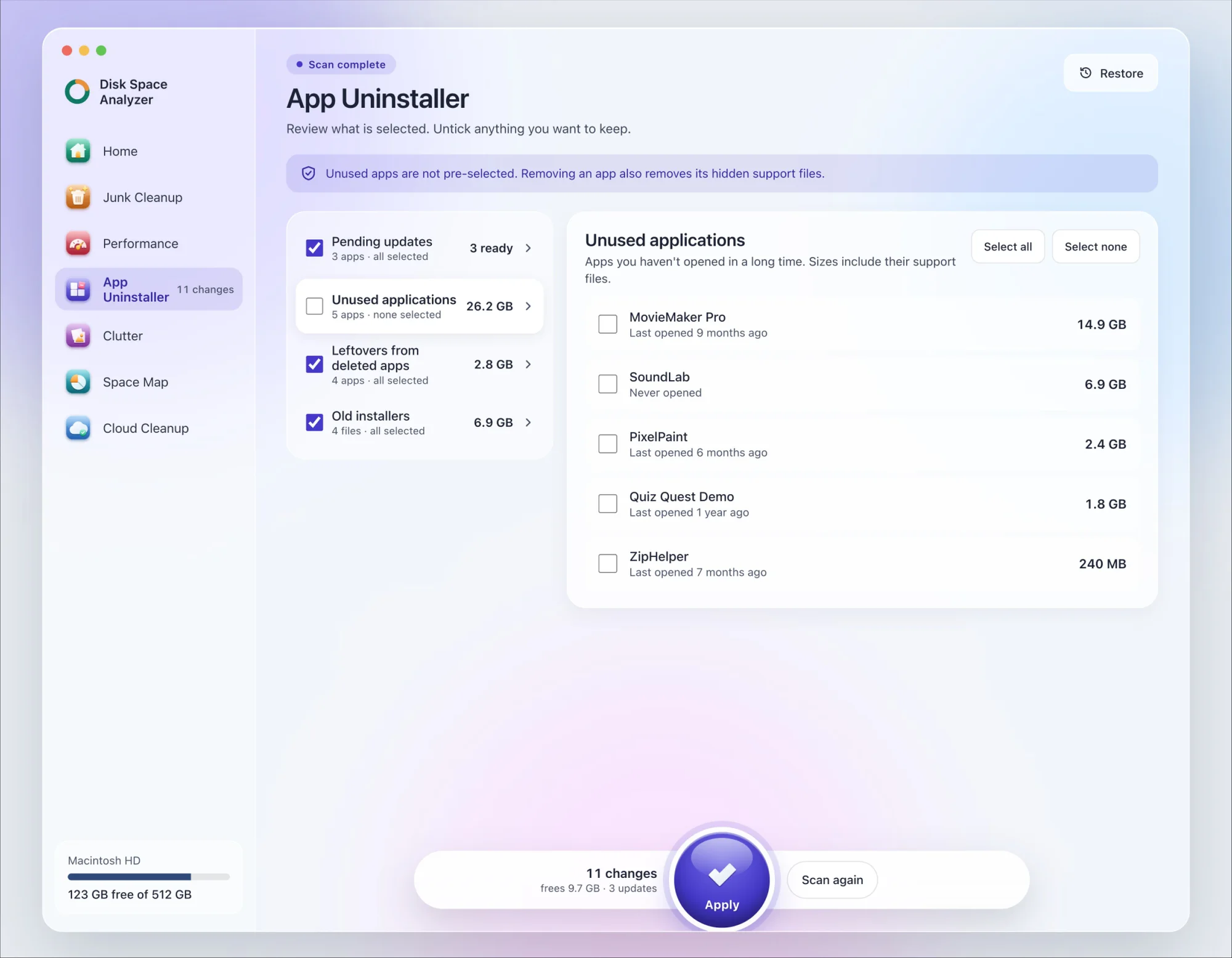
We make DissectMac, so this is our tool. App Uninstaller does the Library search for you, so you don't have to visit each folder above.
- Open DissectMac, go to App Uninstaller and press Scan.
- Find zoom.us in the list of applications and tick it.
- Press Apply. Zoom goes together with its hidden support files, so move your local recordings out of Documents > Zoom first.
Already removed Zoom with its own uninstaller? Its files show up in the Leftovers from deleted apps group instead. The Keychain entries aren't files, so remove those in Keychain Access if you want them gone. The scan is free; removing from inside the app is part of Pro, $19.99 once, and anything removed is kept for 30 days, so Restore brings it back.
Why is there no Uninstall option in Zoom's menu?
Check the menu next to the Apple menu, named Zoom Workplace on current versions or zoom.us on older ones. If the option isn't there, update Zoom, or remove it by hand: drag zoom.us to the Trash and delete the files in the table above. On a work Mac, ask your IT team.
Does uninstalling Zoom delete my recordings?
Cloud recordings no. They stay in your Zoom account. Local recordings are in Documents > Zoom on your Mac, and they're only gone if you delete that folder, so move it first.
Does Zoom leave a web server on my Mac?
Not anymore. Older Mac versions of Zoom ran a hidden local web server that stayed after you deleted the app and could reinstall Zoom when you clicked a meeting link. After it was reported in July 2019, Zoom removed the server in an update and added the uninstall option to its menu, and Apple pushed a silent macOS update that removed the server from Macs. Current versions don't install it.
Why does Zoom keep coming back after I uninstall it?
Usually because something reinstalls it: opening a Zoom meeting link offers to download the app again, and on a work Mac your IT department may push it automatically. Join meetings in your browser instead, or ask IT to remove it from the Mac's managed apps.
More guides
Uninstall
How to Uninstall Apps on Mac Completely (Leftovers Included)
How to uninstall apps on a Mac properly: Finder, Launchpad, official uninstallers, apps that won't delete, and the ~/Library leftovers most guides skip.
Uninstall
How to Uninstall Xcode on Mac
Uninstall Xcode on Mac completely: remove simulator runtimes first, delete Xcode.app, then clear DerivedData, Archives and device support in ~/Library/Developer.
Uninstall
How to Uninstall Steam on Mac (and Its Games)
How to uninstall Steam on Mac: remove games inside Steam, quit it, drag it to the Trash, then clear the Steam folder in ~/Library where your games live.
Uninstall
How to Uninstall Spotify on Mac (Completely)
Uninstall Spotify on Mac: quit it, move it to the Trash, then delete the cache and support folders Spotify lists for a clean reinstall.