On this page
CleanMyMac X is good software. It's polished, feature-rich, and does a lot. But for many users, the yearly subscription feels like overkill when all they want is to find out what's eating their storage.
We get why MacPaw charges a subscription: they have a team to support and regular updates to ship. But for users who just need to visualize their disk space occasionally, there's a simpler option.
That's why we built DissectMac differently.
The subscription vs. one-time model
CleanMyMac X uses a yearly subscription model (pricing varies by region and plan). Over a few years, those costs add up. And if you stop paying, you lose access to the features.
DissectMac works differently:
- Free tier: Full visualization and disk analysis, with no limits and no time limit.
- Pro tier: A small one-time payment, with no renewal emails and no "subscription expiring" popups.
We wanted to build something we'd actually want to use ourselves without ongoing costs.
Privacy: your files stay on your Mac
Some cleanup tools use cloud databases to identify junk files and outdated apps. This can work well, but it means metadata about your system may be processed externally.
DissectMac is 100% local. Your file structure never leaves your machine, there is no account system or telemetry, and nothing phones home.
If you're handling client work, code repositories, or anything sensitive, this matters.
Visualization vs. "magic clean" buttons
CleanMyMac's one-click "Clean" button is convenient. But it's also a black box. You click it, stuff disappears, and you hope it didn't delete anything important.
We've heard from users who got burned by automated cleaners that deleted files apps actually needed. It's rare, but it happens.
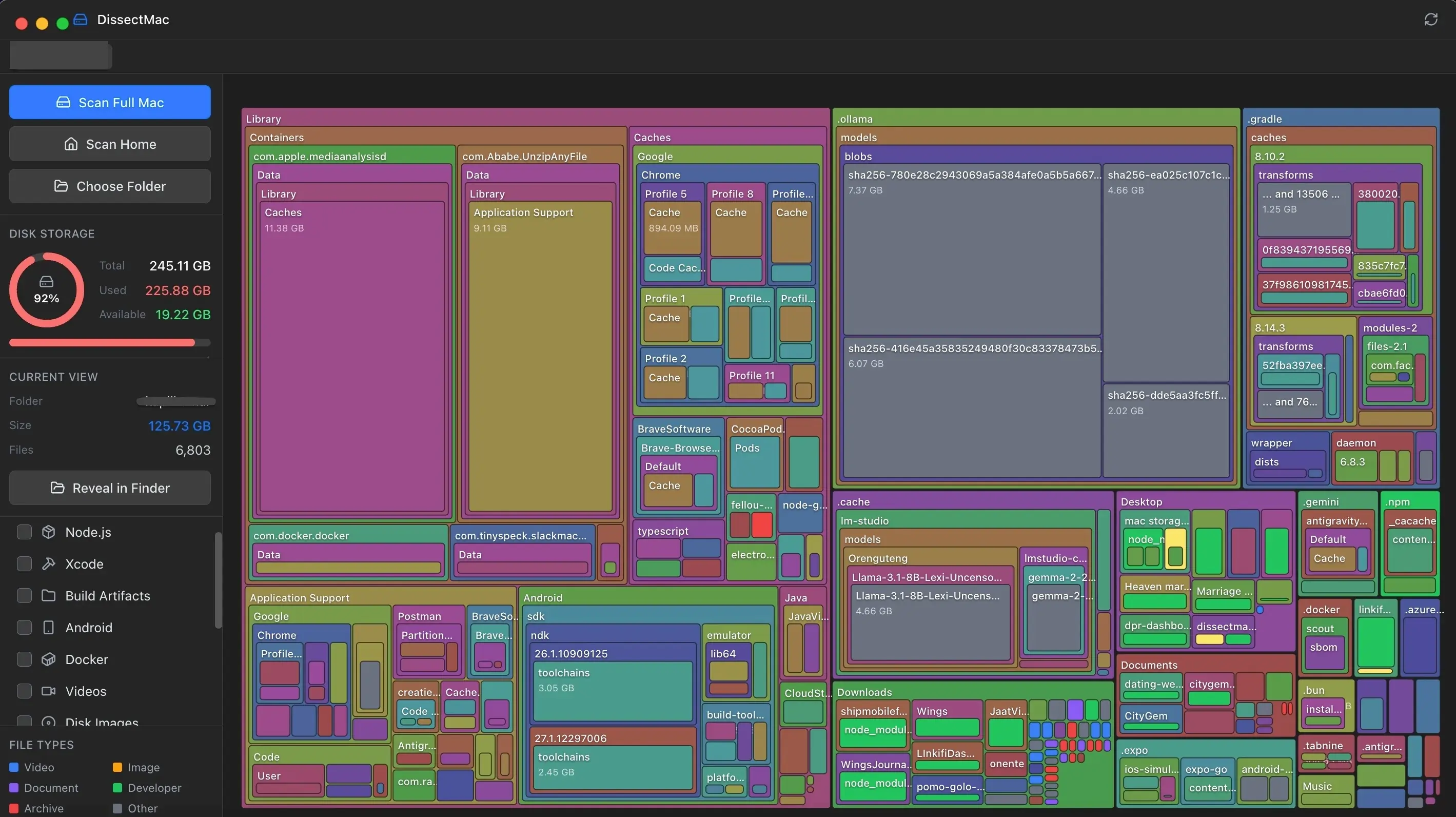
DissectMac doesn't delete anything automatically. It shows you a visual map of your drive. The biggest blocks are the biggest files. Click a block, see the path, right-click to reveal in Finder.
You make the decision, not an algorithm.
When CleanMyMac X makes sense
To be fair: if you want malware scanning, app updating, and system maintenance all in one place, CleanMyMac X is good at that. It's a full "Mac maintenance suite."
But if your problem is specifically "my disk is full and I don't know why," you might not need all those features. You just need to see what's taking space.
The verdict
- Use CleanMyMac X if: You want a full-service maintenance tool and the subscription model works for you.
- Use DissectMac if: You want to find the big files, make your own decisions, and prefer a one-time purchase.
More guides
Compare
DaisyDisk Alternatives: Free Disk Analyzers We've Actually Tested
The best free DaisyDisk alternatives for Mac in 2026, compared: DissectMac, GrandPerspective, PocoDisk, OmniDiskSweeper, Disk Inventory X and SquirrelDisk.
Compare
GrandPerspective is Great. But It's Time for Something Modern.
GrandPerspective is free but feels dated on Apple Silicon Macs. Compare speed, UI & features with a modern alternative. Both are free →
Speed
Why Is My Mac So Slow? 8 Causes and How to Fix Each One
A slow Mac usually has one of 8 causes: a full disk, memory pressure, a runaway process, login items, heat or old hardware. Find yours in 5 minutes and fix it.
System Data
What Is "Other" in Mac Storage, and How Do You Clear It?
'Other' in Mac storage is caches, logs, snapshots, backups and anything macOS can't categorise, renamed System Data in macOS 12. What's in it, how to clear it.